
◷ Reading Time: 7 minutes
This article explains a project that integrates rule-driven decision models with advanced AI personalization to optimize guest offers in the accommodation industry.
Project Overview
In the hospitality industry, offering the right offers( free nights, late checkouts, or special packages) can make a big difference. Traditionally, hotels and providers have used simple rules (like how long you’re staying or if you’re a returning guest) to decide which offers to give. But here’s the problem: these rules don’t tell us what guests actually want or appreciate. Sometimes, guests get offers that don’t matter to them, which can feel impersonal or even annoying.
This project addresses these limitations by combining clear business rules to ensure eligibility, and AI Powered Arbitration: that learns from feedback to figure out what guests truly value. This article walks you through how our model works, with a special focus on the AI components that make it all possible.
Rule-Driven Eligibility
The first step is straightforward. We use business rules to filter which offers a guest is eligible for. For example:
- Is the guest a returning customer?
- How long are they staying?
- Are they traveling with children?
These rules make sure we only consider offers that make sense for each guest.
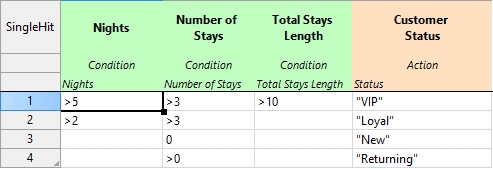
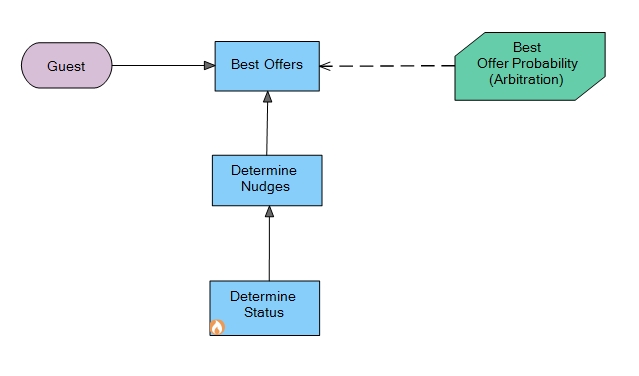
Determine Guest Status
Business rules evaluate the profile to assign guest status (VIP, returning, etc.)
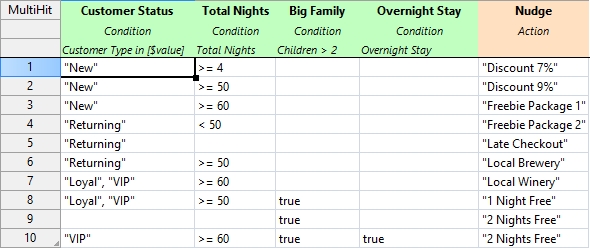
Determine Nudges
Determine what offers the guest qualifies for.
Collecting Guest Feedback
After a guest’s stay, we ask them what they thought about the offers they received. Did they use the late checkout? Did they enjoy the complimentary breakfast? This feedback is crucial because it tells us what actually worked and what didn’t, and we store it along with details about the guest and their trip.
AI Steps In: Learning and Predicting
This is where things get interesting. We use the feedback data to train AI models. These models learn patterns—like which types of guests tend to like certain offers—and use that knowledge to make predictions for future guests. So, instead of just giving everyone the same set of offers, we can personalize recommendations to each guest.
How To Train
In the Data Analytics extension, we have a decision predictor module. Decision learner and decision predictor are part of decision predictor module. The Decision predictor is the one that predicts the probability. The Decision learner is the one that uses the captured information and trains the algorithm. In order to use this Decision Predictor Module we have to import it. You can use FlexRule Interactive Shell to write these expressions.
import('DecisionPredictorModule',,,'FlexRule.Extensions.Analytics.dll')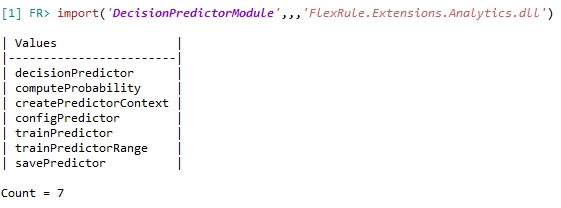
What is Context/Dimension?
Context (also called “dimension”) is just all the things we know about the guest and their situation. Therefore, when you want to train the AI, you have to know what that dimension is.
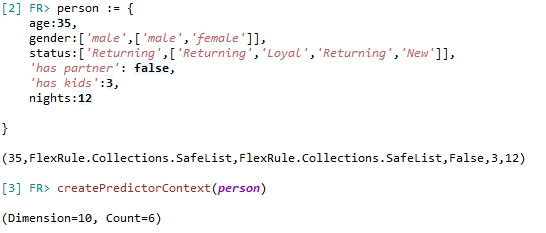
In this example we have a person of Dimension 10. So you need, so you need a predictor with the dimension of 10. When another person comes, you just need to make sure this dimension remains consistent.
Create Predictor
We need to create predictor including all the offers we offer and the Dimension.

Train Predictor
This is the module that actually trains our AI models. It takes all the feedback and context data we’ve collected, processes it, and builds models that can spot patterns. Whenever we get new feedback, we have to update the trainPredictor and update the models so they keep getting better. Along with the trainPredictor we have to give the rewards(number) for the offers (How much this values for your business or what is the price of it )
trainPredictor(predictor,person,'Late Checkout', 16 )We have to train the AI model in this method with all the feedback we got from the customer.

Compute Probability
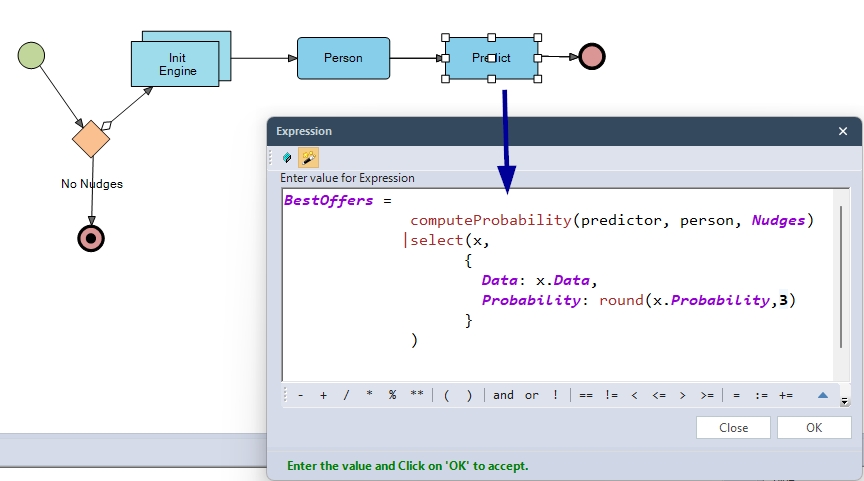
Here’s where the math happens. Given a guest and an offer, computeProbability calculates the likelihood (as a number between 0 and 1) that the guest will like or use that offer. It uses statistical models and machine learning algorithms under the hood.

Save Predictor
You can save the trained predictor using:
savePredictor(predictor,'d:/data/models/1.json')Best Offer Probability (Arbitration)
After we train the model based on the guests feedback we going to use that predictor to compute the probability for a given circumstance inside our model.
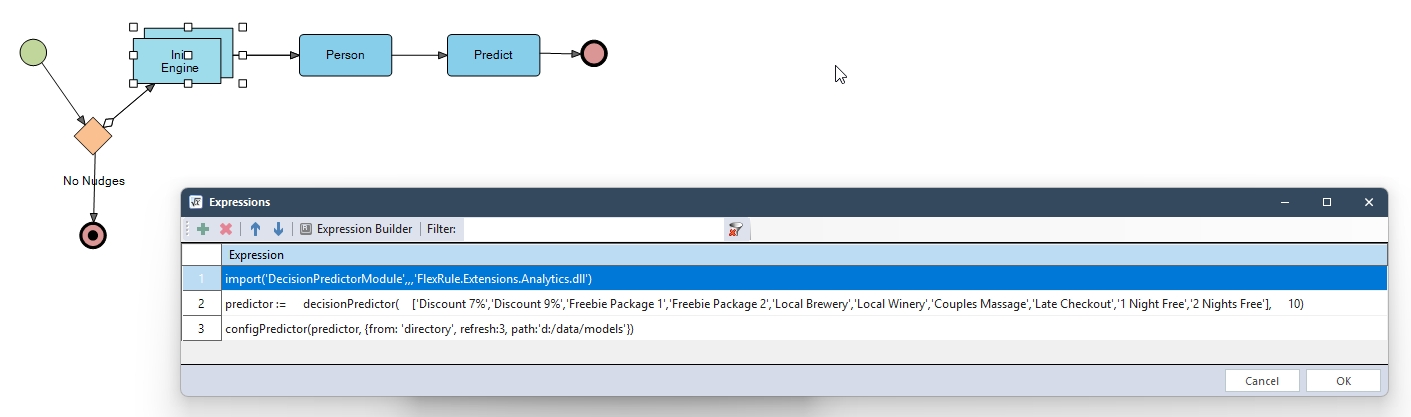
As we discussed earlier, creating a context, we can also use the input parameters as follows to create the context.,
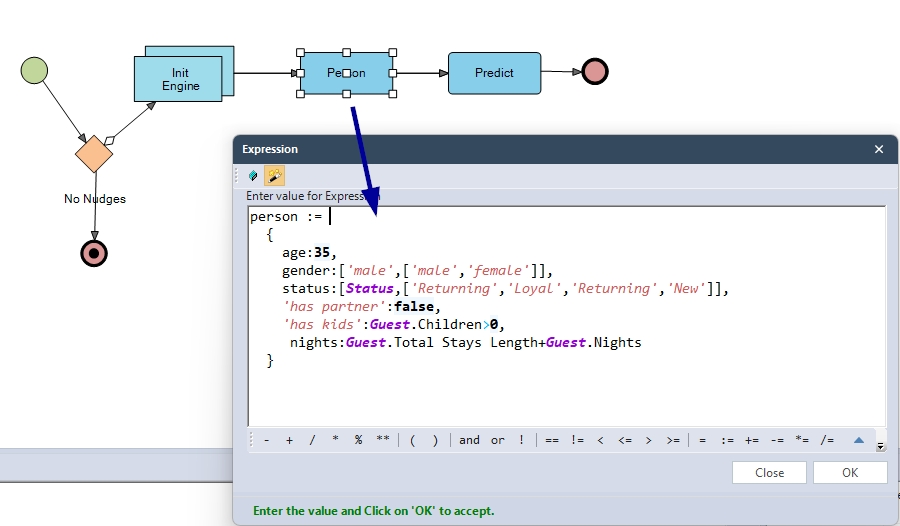
Then we predict the probability and combine it with the Best Offers, which we determined in the previous decision.
How It All Fits Together
We used the Business Knowledge node to link the Probability Calculation Flow to the Decision Graph. And Input Data node to capture the Guest input data.
Prerequisites
- You need to have the latest Analytics Extension(10.1) and FlexRule Designer 10.1 in order to run this model.
- You need to copy paste already trained data set into your local file system unless you dont have any pretrained data set.(path:’d:/data/models’) – You can copy the files inside the project folder called Trained Data and paste it to the above mentioned path.
Download Project
Use the attachment at the end of the page to download the sample project.