
◷ Reading Time: 6 minutes
Traditional orchestration in customer engagement often relies on rigid, prescriptive flows-where every possible path is predefined and static. This approach struggles to adapt to real-world scenarios where customer behavior is unpredictable and evolves over time. The Continuous Decision Model (CDM) addresses these limitations by enabling adaptive, event-driven decisioning that continuously responds to changes in customer context and actions.
Scenario
Let’s examine how CDM can be applied to a typical customer journey scenario.
The journey starts when a provider sends a personalized offer. The selection of the most relevant offer is determined using a Decision Table, which evaluates customer attributes (such as device, customer status, contract, risk status) to choose the relevant action. This ensures that each customer receives an offer tailored to their current context.
After the offer is sent, multiple customer actions and events can occur over time:
- The customer may open the email, log into the portal via the website, or ignore the offer.
- At any time, the customer can revisit the site or reopen the email, triggering further engagement opportunities.
- If the customer interacts (e.g., clicks “Learn more” in the email), the system displays additional information, and then the customer logs into the portal to view the offer.
- The customer can then accept or reject the offer, or the offer may timeout if not acted upon within a set period.
- The customer can also cancel the journey at any time.
At each stage, the CDM continuously monitors the customer journey’s event triggers. The model tracks event triggers (email opened, portal visited, offer accepted/rejected, timeout, etc.) and determines the next best action.
If you want to learn more about the tools that are used in the Continuous Decision Model, you can follow this article.
Determine Offer Action ID
This Decision Table is used to determine the most appropriate customer offer based on a combination of customer attributes. Each row in the table represents a specific rule, mapping a unique set of input conditions, such as device type, risk status, value status, product usage, contract details, and customer profile, to a corresponding Action ID. The Action ID serves as the output of the decision table, identifying which offer or action should be presented to the customer for that scenario.

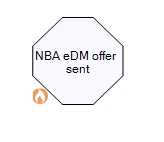
This Decision Table is set as an “On Entered” event execution in the “Offer Sent” stage
Offer Activation
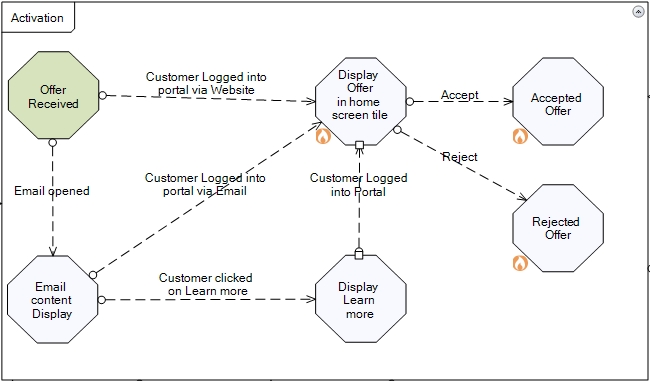
When a customer receives an offer, the journey can proceed along several paths depending on their actions. From the “Offer Received” stage, the customer may either open the email containing the offer or log into the user portal via the website. If the “Email Opened” event occurs, the process advances to the “Email Content Display” stage, where two possible actions can follow: the customer might log into the portal via the email, or they might click on “Learn more.” If the customer clicks “Learn more,” the journey transitions to the “Display Learn More” stage. From there, if the customer logs into the portal, the process moves to the “Display Offer in home screen tile” stage. Alternatively, if the customer logs into the portal via email directly from the “Email Content Display” stage, or if they log into the portal via the website from the initial “Offer Received” stage, both actions also lead to the “Display Offer in home screen tile” stage. Then the customer accept/reject triggers can occur.
The entire customer journey depicted in the following diagram is encapsulated within a boundary called “Activation”, which represents the scope of the long-running decision.
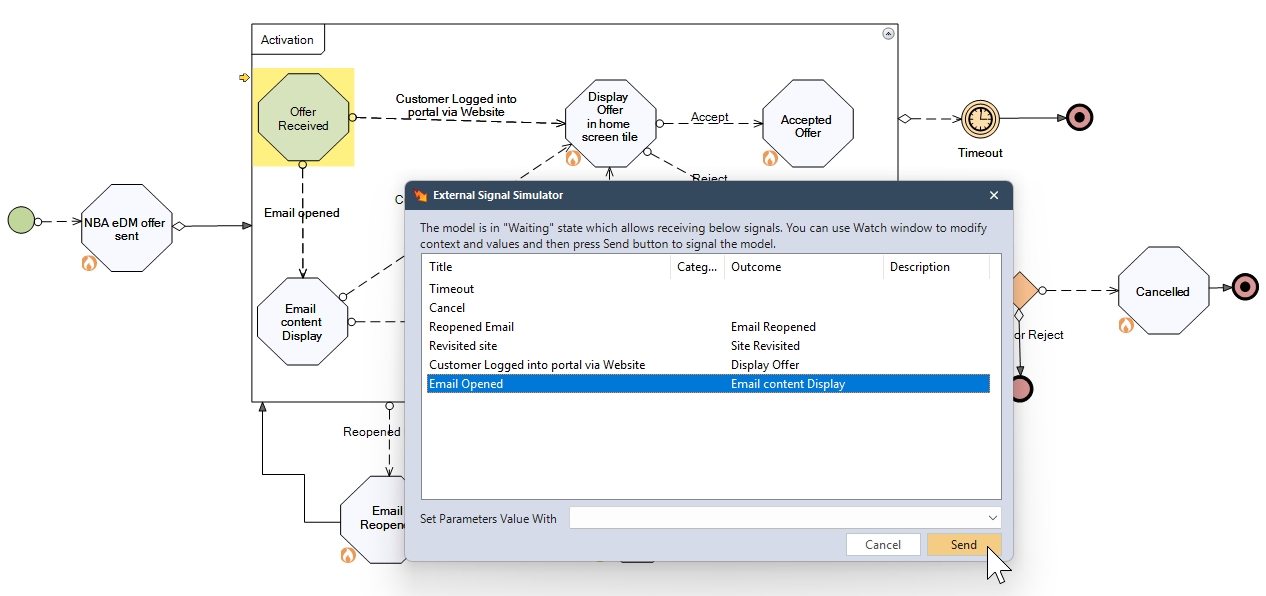
Outside this Activation boundary, several external events can occur that influence the model’s ongoing execution. For example, if the customer reopens the email or revisits the website, these events act as triggers that redirect the execution back into the Activation boundary. This allows the model to adapt dynamically to customer behavior over time.
Other external events, such as timeout or cancel, will terminate the execution of this long-running decision model, indicating that the offer is no longer valid or the customer has opted out, thus ending the journey within this context.
If the customer chooses to either accept or reject the offer while within the activation boundary, this execution will terminate the execution of the long-running decision model for that journey. As modelled in the CDM, both the “Accept” and “Reject” events from the “Display Offer in home screen tile” stage lead directly to the stages “Accepted Offer” and “Rejected Offer,” respectively. Once a definitive outcome is reached, the model terminates further execution for that customer and offers an instance. This is captured in a condition outside the Activation boundary by using context history. In the Context History, if the node names of “Accepted Offer” or “Rejected Offer” exist, then execution will terminate.

Debug the Model
You can use the Run Template to debug this model.

When debugging the model, a pop-up will appear as the execution enters a stage, allowing you to select the event you want to trigger. Once you choose an event from the list, click Send to trigger it and proceed with the execution.
Download the Project
You can download this project from the attachment available on this page. To run this model, ensure you have the following minimum versions installed: FlexRule Designer version 10.1 or above and FlexRule Runtime version 10.1 or above.