
◷ Reading Time: 2 minutes
You can Import csv, and excel files directly into a Booklet document or open it if they exist (already imported).
Import Excel Files into Booklet
Place your Excel file inside the project folder and right click on the Excel file in Project Explorer window. Then click on “Import into Booklet”

Then it will allow you to select the Excel sheet.

Once you select the Excel sheet, click ok.
Import csv files into Booklet
Place your csv file inside the project folder and right click on the csv file in Project Explorer window. Then click on “Import into Booklet”
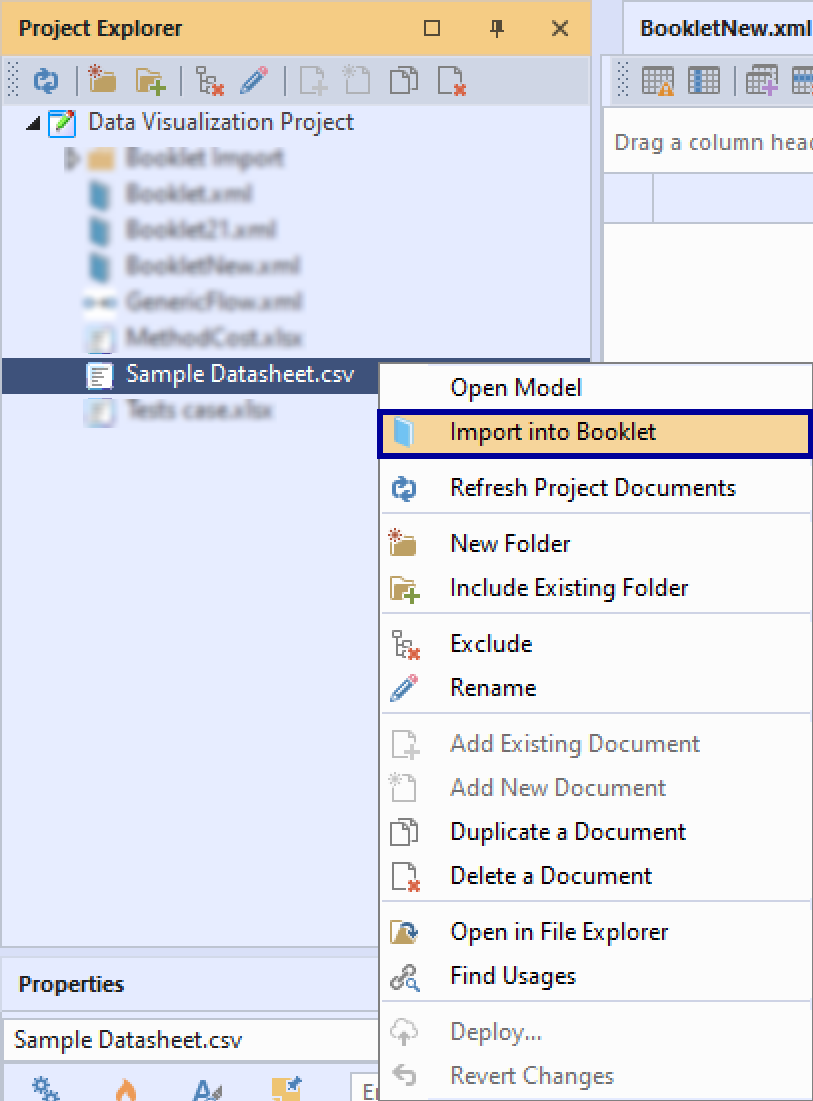
Open the Booklet
Once it successfully imported, it creates a folder called “Booklet Import” and create a flow diagram and the booklet relates to your Excel sheet inside the folder. Also it opens the booklet document automatically. You can run the booklet to view the data.
If you already imported the Excel file or csv file, you can directly open the booklet by right click on the Excel file or csv file in the Project Explorer and select “Open {Booklet Name}”