
◷ Reading Time: 15 minutes
When a superannuation account holder contacts the call center to cancel their account, it presents a critical opportunity for customer retention. This article introduces a comprehensive FlexRule model designed to intelligently assist call center agents during such interactions.
The model dynamically analyzes the member’s profile and current circumstances to recommend personalized retention offers such as insurance upgrades, investment switches, or contribution adjustments, complete with tailored speaking notes for the agent to guide the conversation naturally. Leveraging AI-powered arbitration, the model prioritizes these offers based on their likelihood to retain the customer.
If suitable offers are identified during the conversation, the system can also automate follow-up emails to the member. This documentation provides a step-by-step walkthrough of the FlexRule model, enabling technical audiences to understand, implement, and extend the solution for maximum impact.
Data Standardization via Fact Concept
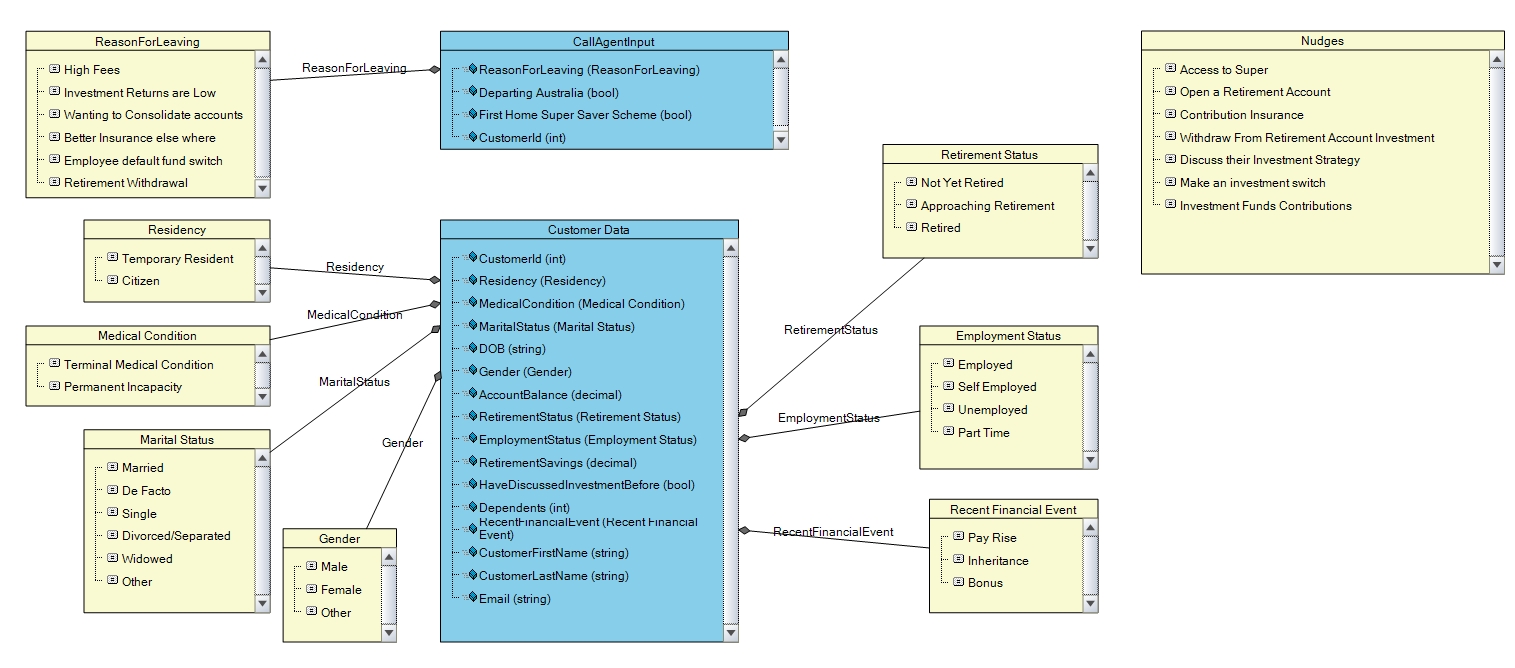
The model’s data integrity is established through a Fact Concept document, beginning with the CallAgentInput fact containing the initial customer ID. The customer ID will be used to retrieve standardized customer data records used across all subsequent decision logic.
Database Setup
The attached database script in the Glossary folder inside the project provides a ready-to-execute SQL solution that establishes all necessary tables, relationships, and indexes for this model. The CustomerData table serves as the central repository for member profiles, designed to be queried via parameterized SQL statements where the CustomerID from the CallAgentInput dynamically filters results.
Determine Offers Eligibility
Investment Funds Contributions
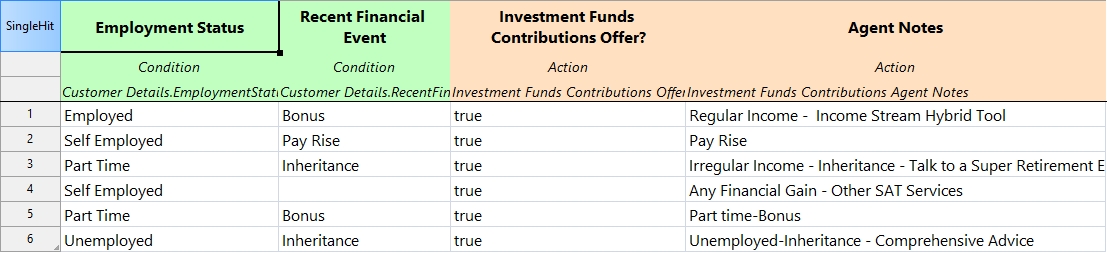
The Decision Table evaluates offer applicability through two key data points: Employment Status and a recent financial Event retrieved from the Customer Details record. Both factors directly influence the assignment of personalized Agent Notes.
Make an Investment Switch
The “Make an Investment Switch” offer is determined using a Decision Table that evaluates multiple conditions: the member’s Age (calculated from their date of birth in the Business Formula document), Account Balance, Retirement Status, and the “Reason to Leave” (sourced from Call Agent Input). Additionally, Market Conditions are incorporated as a separate input from the Business Formula document. Each combination of these factors is mapped to a specific Boolean outcome, including tailored agent notes that support the call agent.

Discuss their Investment Strategy
The “Discuss their investment strategy” offer follows a similar decision table approach, incorporating these factors: the member’s Age, Account Balance, Retirement Status, and whether they “Have discussed before” (all sourced from Customer Details), along with the Reason to Leave from Call Agent Inputs. As with other offers, each rule within this table maps to specific agent notes, ensuring agents can effectively guide the conversation.

Determine Investment Refinements
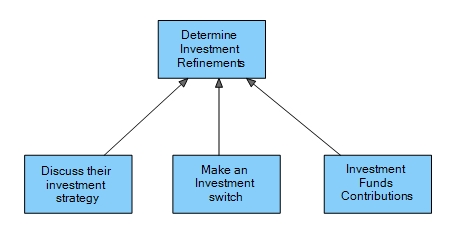
To streamline the investment-related offer determination, the outputs from the three previously described decision tables (“Make an Investment Switch,” “Discuss their investment strategy,” and “Investment Funds Contributions”) are consolidated under a single “Determine Investment Refinements” decision node. This decision node itself is an empty node, serving as a logical grouping to simplify the decision flow and improve model maintainability. By encapsulating the investment offer logic within this node, the overall Decision Graph is made more concise and easier to navigate.
Withdraw from Retirement account Investments
This offer will be determined by another set of decision which will explain as follows.
Calculate Investment Performance Score
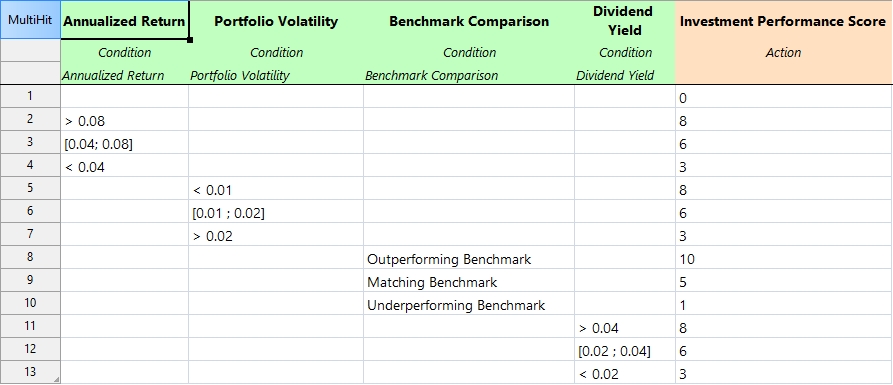
This investment performance score is calculated based on Annualized Return, portfolio volatility, benchmark Comparison, dividend yield, based on the customer’s investment profile, and performance based on the market condition. Because the decision table’s aggregation mode is set to “Sum,” the output parameter returns the total score accumulated across all conditions that evaluate to true during execution.
Determine Withdrawal Suggestions
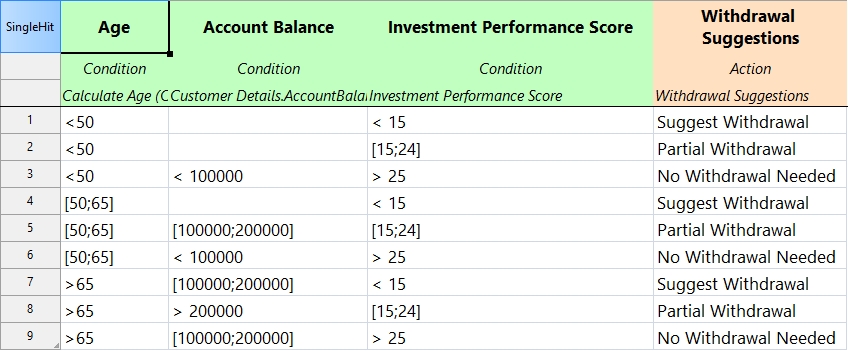
This decision is implemented as a decision table that considers the Investment Performance Score from the previous step, alongside the customer’s Age and Account Balance sourced from Customer Details. As with other decision tables, the combination of these inputs determines the appropriate withdrawal suggestion, if any.
Evaluate Government Regulations
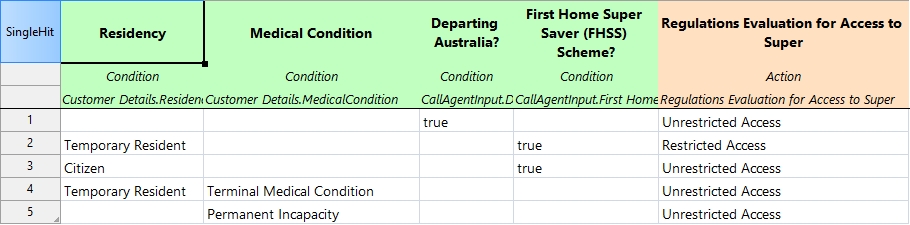
This Decision Table assesses compliance with superannuation access regulations by evaluating four key parameters: Residency status and medical conditions (sourced from Customer Details), along with Permanent Departure from Australia status and First Home Super Saver Scheme enrollment (provided via Call Agent Input). The Decision Table determines whether regulatory conditions permit early access to superannuation funds, mapping each combination of these factors to specific compliance outcomes and access eligibility flags.
Withdraw from Retirement Account Investment
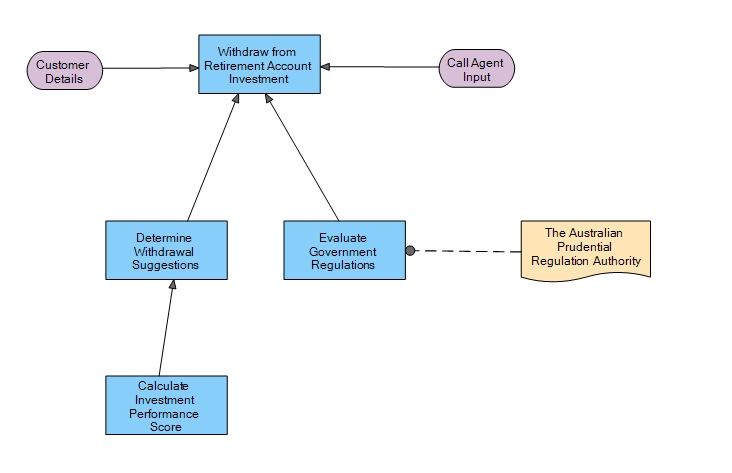
The last step of determining this offer combines output from the Regulations Evaluation table, Withdrawal Suggestion table, and the Call agent-reported reason for cancellation. This unified decision table determines whether the withdrawal from retirement account offer is viable to navigate the conversation effectively.

We can combine these Decisions into a Decision Graph as follows.
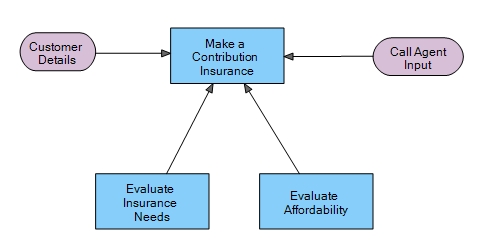
Make a Contribution Insurance
This offer eligibility again derived from the 3 Decision Tables.
Evaluate Insurance Needs
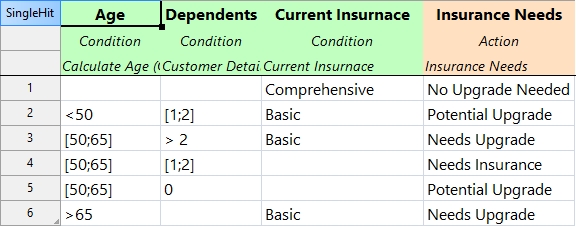
This decision table assesses insurance requirements by analyzing three conditions: the member’s Age, number of Dependents, and existing insurance coverage status (all sourced from Customer Details). The output categorizes insurance needs into tiers.
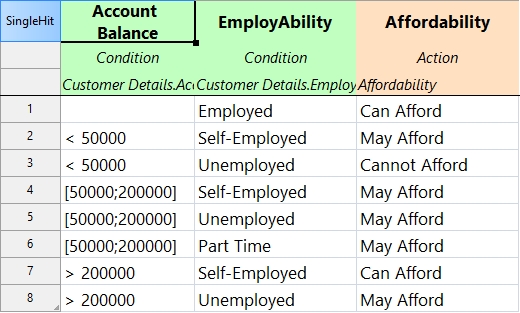
Evaluate Affordability
This decision table assesses affordability by analyzing two conditions: the member’s Account Balance and Employability Status, both sourced from Customer Details. The output categorizes affordability into tiers.
Make a Contribution Insurance Offer
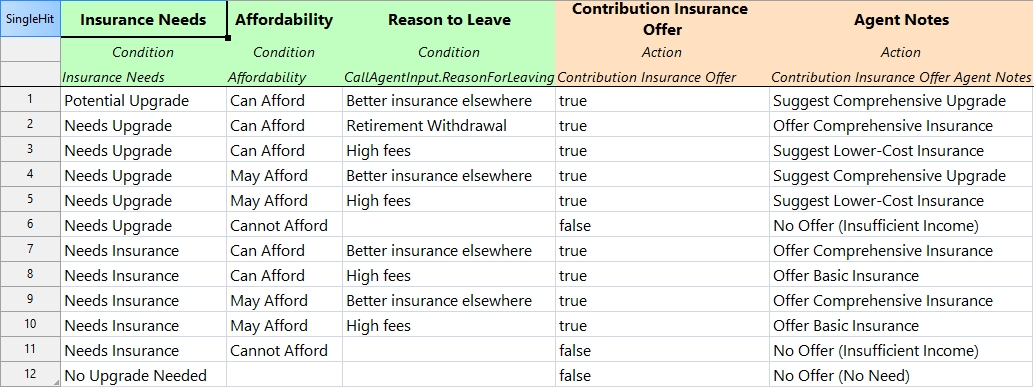
This decision table combines outputs from the Affordability and Insurance Needs to determine whether this customer is eligible for Contribution Insurance Offers.
Then the final Decision Graph will be as follows.
Open a Retirement Account
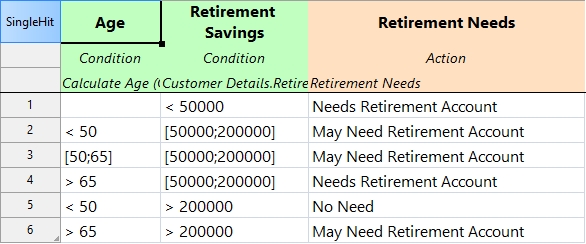
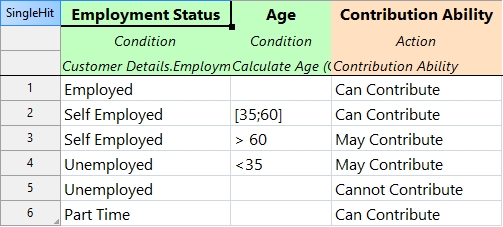
Two other decisions will determine this offer “Open a Retirement Account.” The Decision Tables show those two decisions as follows.
Evaluate Retirement Account Needed
Evaluate Contribution Ability
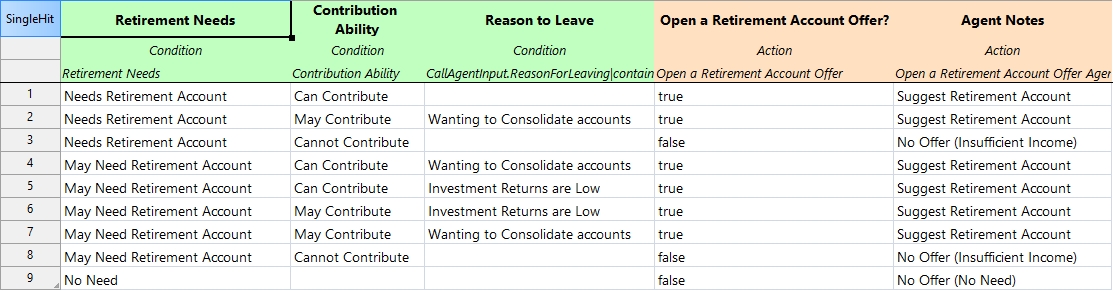
The two outputs of the above decision tables will then be the inputs of the following decision table, along with Reason to Leave. Then the output will be the eligibility of “Open a Retirement Account Offer” with Agent notes.
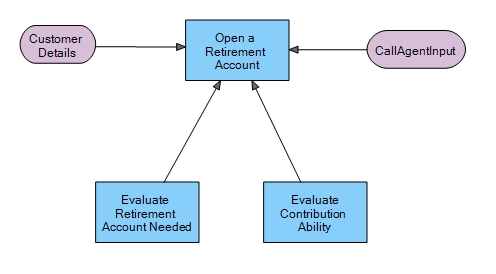
Then the final Decision Graph will be as follows.
Access to Super
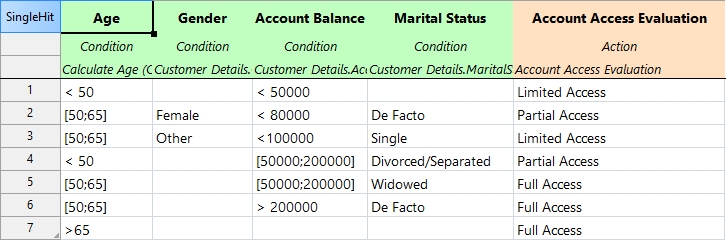
Access to Super offer will be determined by another 2 decisions, which are implemented as Decision Tables as follows.
Evaluate Account Access
Evaluate Regulations for Access to Super
Same Decision Table discussed in here.
Then the two outputs of the previous decision tables will be the input of the following Decision Table.
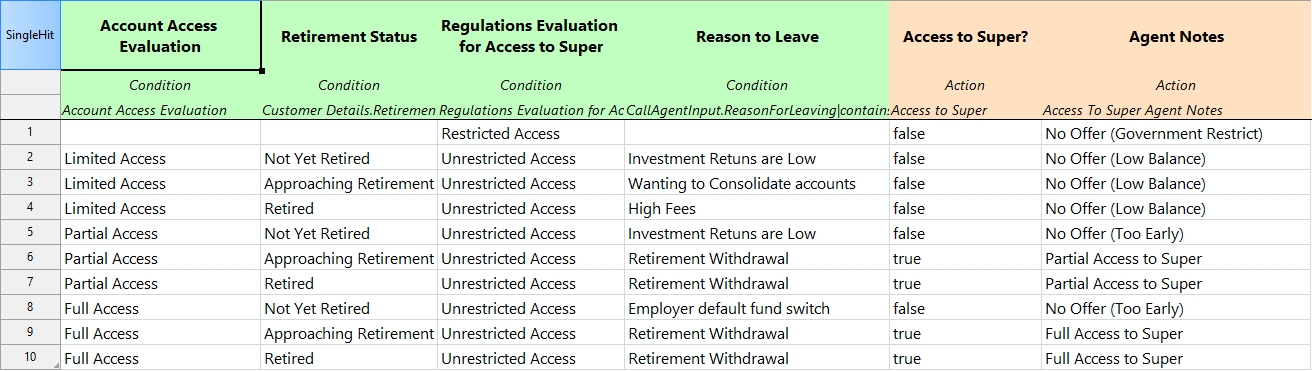
Then the final Decision Graph will be as follows.
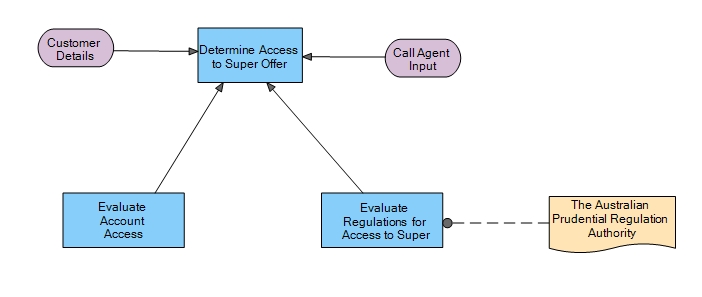
Determine Possible Conversations
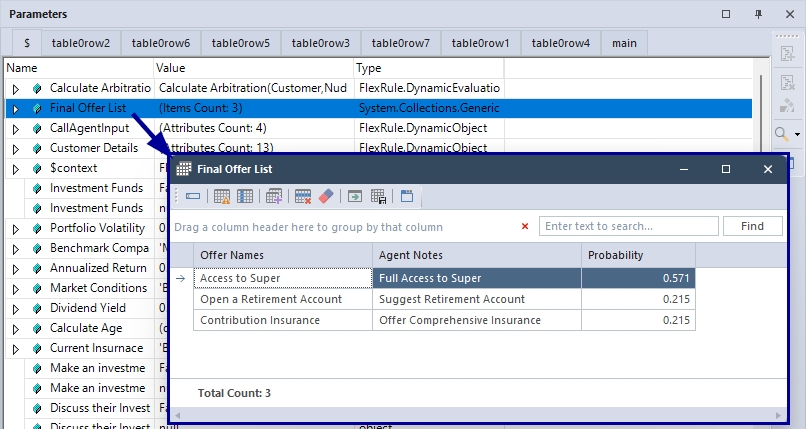
This step gathers all eligible offers from previous decision points and processes them through a decision table. If an offer is marked as eligible (true), its name gets added to an “Offer Names” list, while the related agent notes go into a separate “Agent Notes” list. Once all offers are evaluated, a simple function(Zip) pairs each offer name with its corresponding note, creating a clean “Final Offer List” that call agents can use to guide their conversations.

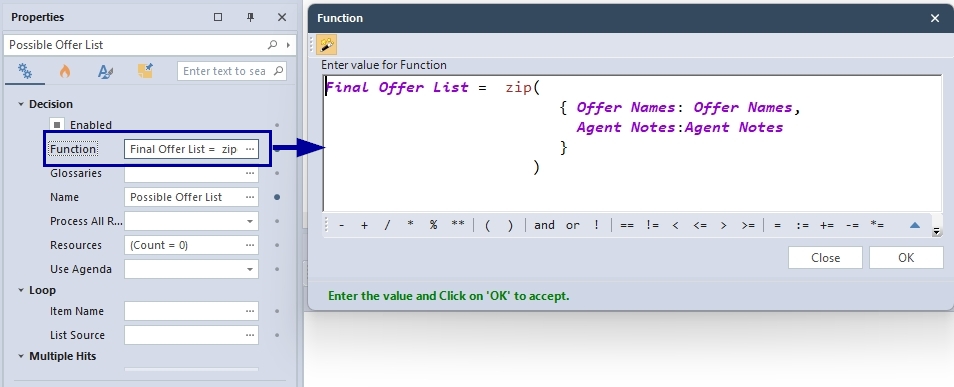
We can now combine all the decision nodes what we discuss so far in our Decision Graph as follows.
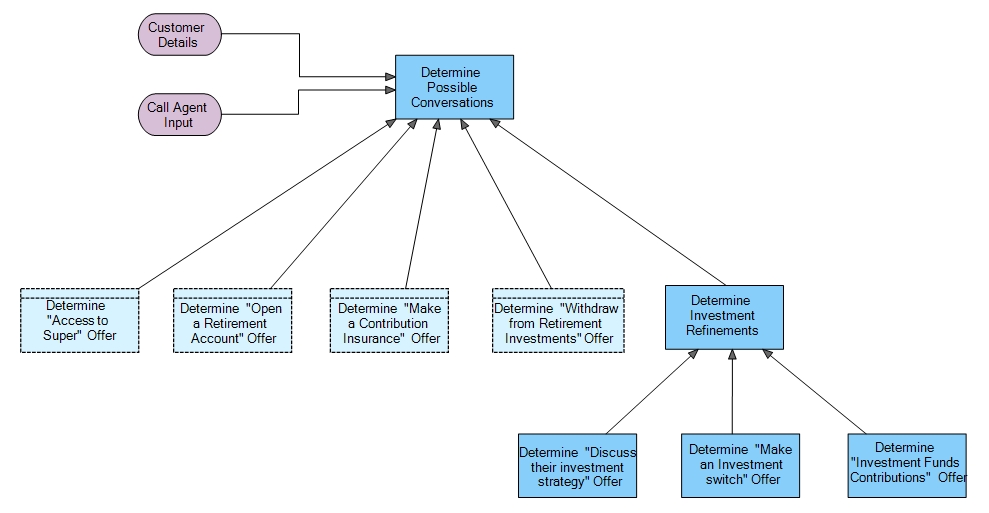
After determining possible conversations, the next step is to determine the best conversation and order the possible conversation list by probability.
Determine Next Best Conversation
In this step, we will calculate the probability of possible conversations based on a previously trained model, leveraging AI techniques such as Reinforcement Learning (RL) to give models rewards based on the impact of the conversation points.
This AI-Powered decision engine enables the decision models to be more situation-aware based on what works and what does not based on the individual context they interact with.
AI Steps In: Learning and Predicting
We use the feedback data to train AI models. These models learn patterns,like which types of guests tend to like certain offers, and use that knowledge to make predictions for future customers. So, instead of just giving everyone the same set of conversation points, we can personalize recommendations for each customer and their situation.
How To Train
In the Data Analytics extension, we have a decision predictor module. Decision learner and decision predictor are part of decision predictor module. The Decision predictor is the one that predicts the probability. The Decision learner is the one that uses the captured information and trains the algorithm. In order to use this Decision Predictor Module we have to import it. You can use FlexRule Interactive Shell to write these expressions.
import('DecisionPredictorModule',,,'FlexRule.Extensions.Analytics.dll')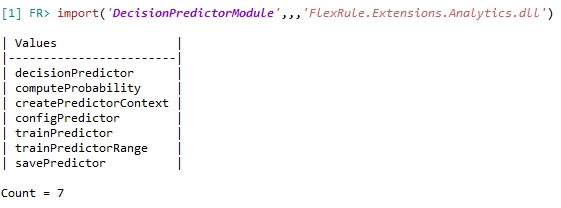
What is Context/Dimension?
Context (also called “dimension”) is just all the things we know about the customer and their situation. Therefore, when you want to train the AI, you have to know what that dimension is.
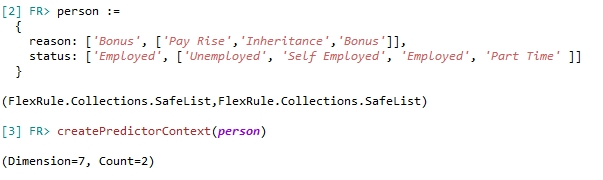
createPredictorContext(person)In this example we have a person of Dimension 7. So you need a predictor with the dimension of 7. When another customer comes, you just need to make sure this dimension remains consistent.
Create Predictor
We need to create predictor including all the offers we offer and the Dimension.

Train Predictor
This is the module that actually trains our AI models. It takes all the feedback and context data we’ve collected, processes it, and builds models that can spot patterns. Whenever we get new feedback, we have to update the trainPredictor and update the models so they keep getting better. Along with the trainPredictor we have to give the rewards(number) for the offers (How much this values for your business or what is the price of it )
trainPredictor(predictor,person,'Open a Retirement Account', 10 )We have to train the AI model in this method with all the feedback we got from the customer.

Compute Probability
Here’s where the math happens. Given a customer and an offer, computeProbability calculates the likelihood (as a number between 0 and 1) that the customer will like or use that offer. It uses statistical models and machine learning algorithms under the hood.

Save Predictor
You can save the trained predictor using:
savePredictor(predictor,'d:/data/super/TrainedData.json')AI-Powered Arbitration
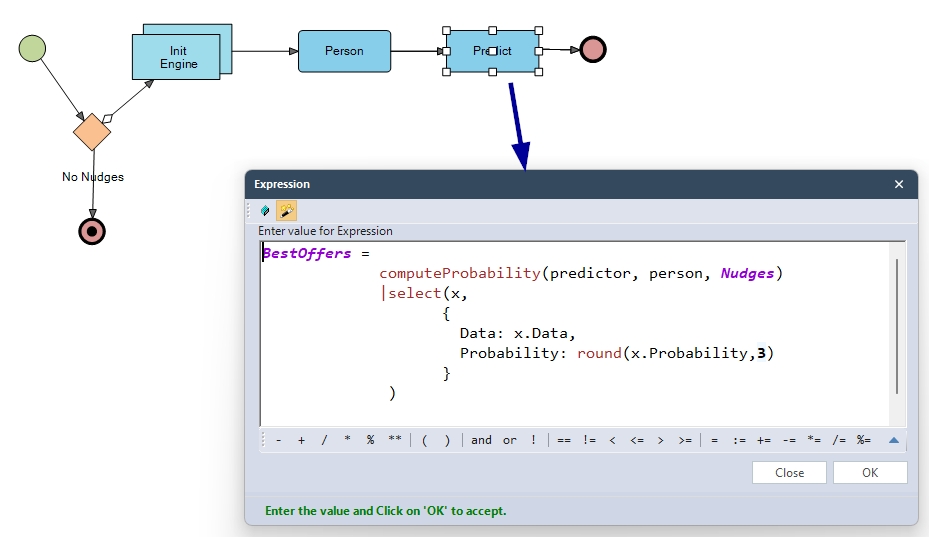
After we train the model based on the Customer feedback, we going to use that predictor to compute the probability for a given circumstance inside our model.
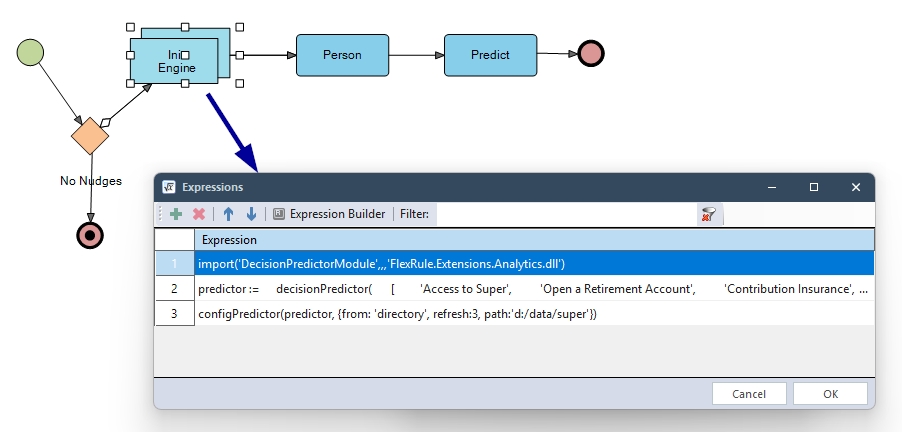
As we discussed earlier, creating a context, we can also use the input parameters as follows to create the context.
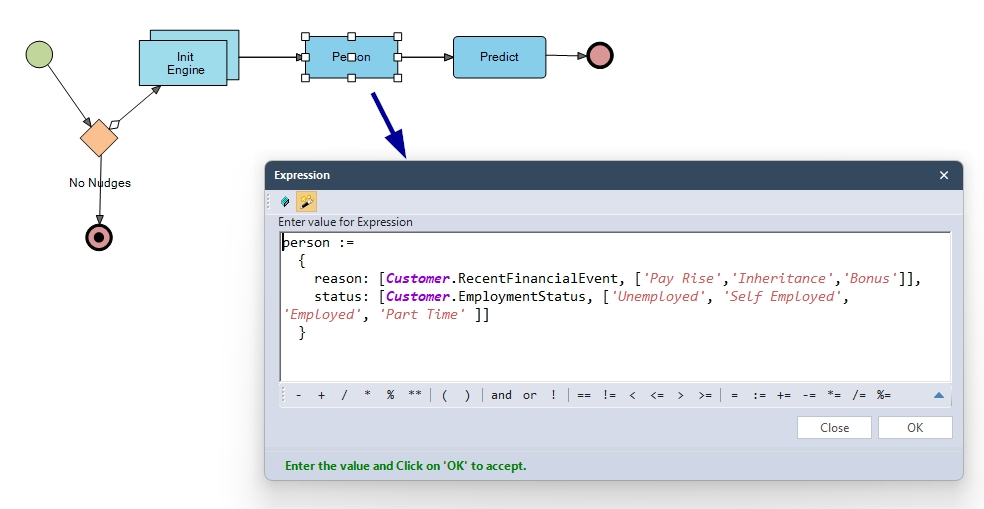
Then we predict the probability and round off to 3 decimal points.
How It All Fits Together
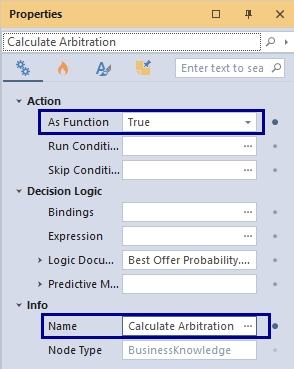
We used the Business Knowledge node to link the Probability Calculation Flow to the Decision Graph and named it as Calculate Arbitration, and set it as a Function.
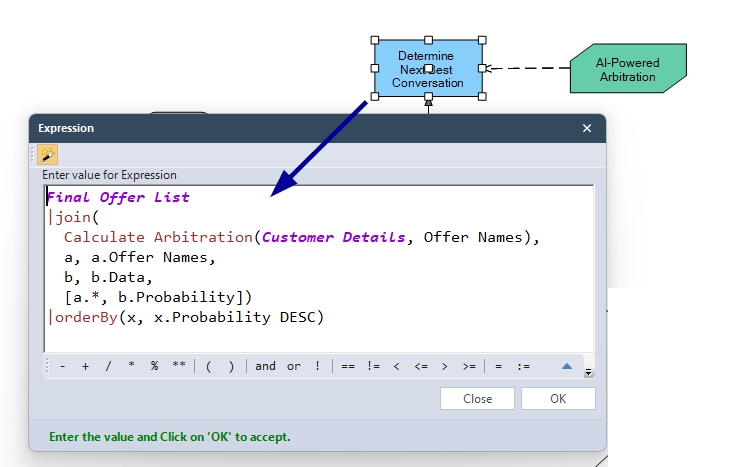
Then, at the final decision node, we join the returning probability list(‘BestOffers’) with our existing ‘Final Offer List’ and order it by probability.
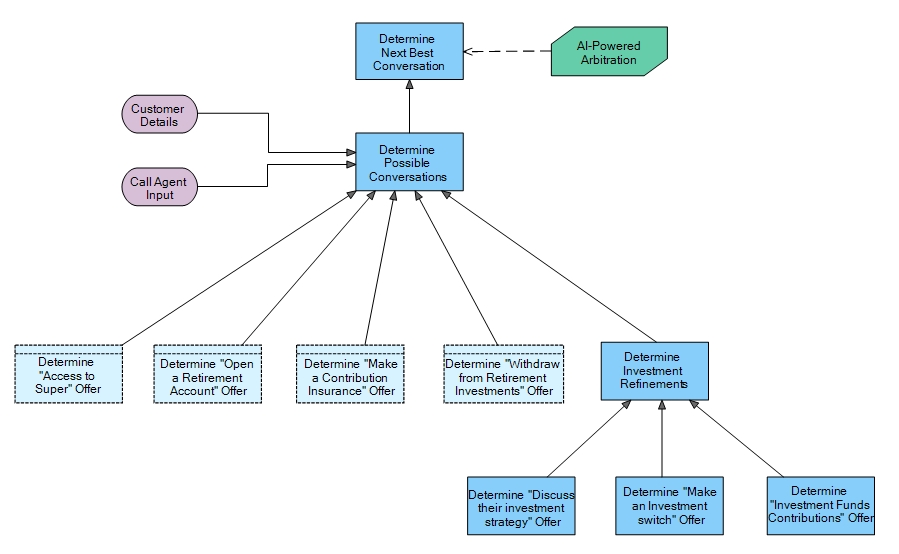
This is how it all fits together in one Decision Graph.
Prerequisites
- You need to have the latest Analytics Extension(10.1) and FlexRule Designer 10.1 in order to run this model.
- You need to copy paste already trained data set into your local file system unless you dont have any pretrained data set.(path:’d:/data/super’)
- You can copy the file inside the project folder called Trained Data and paste it to the above mentioned path.
Run the Model
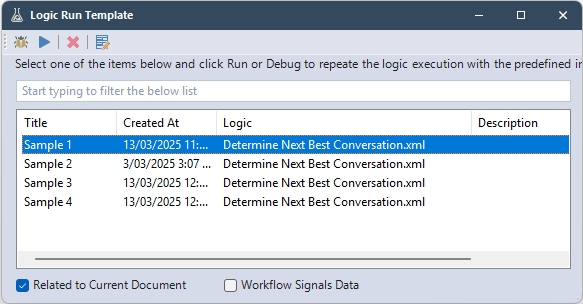
When you open the ‘Determine Next Best Conversation.xml’ it has 4 Run Templates for you to run/debug the model.
Then you can see the results as follows in the Parameter window.
Download Project
Use the attachment at the end of the page to download the sample project.