
◷ Reading Time: 14 minutes
This article explains how to migrate an existing FlexRule Server V8 installation to FlexRule Open V11.
A V8 installation can be migrated directly to V11.4
The migration process:
- Back up the existing V8 database.
- Install the 6 FlexRule Open 11.4 nodes.
- Run the migration command from the identity installation folder.
- Run the migration from each remaining node.
- Start the 11.4 nodes.
- Verify the migration.
- Update the Worker configuration if required.
1. Before You Start
Make sure you have:
- Enough privileges to the existing V8 server config files.
- Enough privileges for the V8 database.
- Enough privileges to run commands on the machine where you will install the FlexRule Open V11.4.
- The FlexRule Open 11.4 installers.
- The V11 Server license file.
- The V11 Runtime license file.
- The 11.4 Runtime
.nupkgfile or runtime folder. - The connection string for the new database.
Important
Do not delete existing users, groups, roles, or credentials before performing the migration.
If you want to keep the V8 installation available for rollback, migrate to a new database rather than upgrading the V8 database in place.
2. Back Up the Database
Create a database backup from the existing V8 database.
For example, run the following command in the Command Prompt:
sqlcmd -S .\SQLEXPRESS -E -Q "BACKUP DATABASE [FRS8] TO DISK = N'C:\Backup\FRS8-before-11.4.bak' WITH INIT"Replace:
.\SQLEXPRESSwith your server nameFRS8with your V8 database name.C:\Backup\FRS8-before-11.4.bakwith your preferred backup location.
The database backup provides a recovery point before the migration.
3. Install FlexRule Open 11.4
Install the following 6 nodes:
- Identity
- Execution Controller
- Execution Worker
- Asset Management
- Workbench
- Events Gateway
Each node has its own installation folder and configuration file.
The default installation location is similar to:
C:\Program Files\FlexRule\Server\11.4\The folders are:
Identity\
ExecutionController\
ExecutionWorker\
AssetManagement\
Workbench\
EventsGateway\
During installation
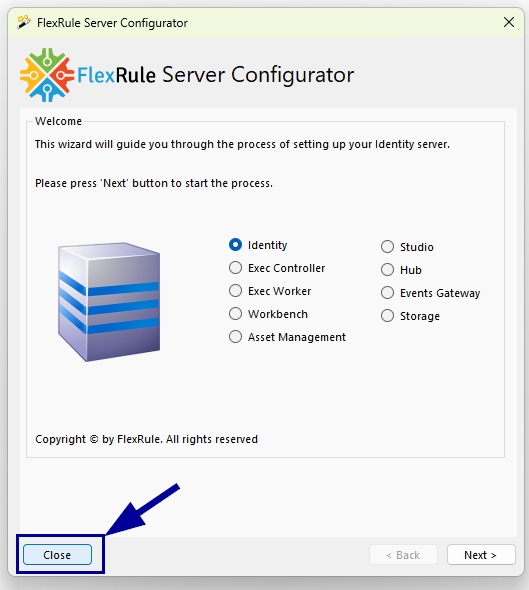
When the configurator opens:
- Do not create or migrate the database.
- Do not create default accounts.
- Do not start the nodes yet.
The migration command will configure the nodes and perform the database migration.
4. Migrate the Identity Node
The Identity node must be migrated first.
Open Command Prompt as Administrator and navigate to the Identity folder.
Example:
cd "C:\Program Files\FlexRule\Server\11.4\Identity"4.0 Edit Old Config File
This step is only relevant if the connection path between the database and the machine hosting FlexRule Server V8 differs from the connection path between the database and the new FlexRule Server host machine.
Edit the old config file and change the following value for DbAddress:
- The old database connection string is:
"Data Source=OldMachine\SQLEXPRESS;Initial Catalog=FRS 11.4.2983;Integrated Security=True" - New path is a remote connection; it needs to be changed to the following:
“Data Source=tcp:<Database IP Address>,<Database Port>\SQLEXPRESS;Initial Catalog=FRS 11.4.2983;Intergrated Security=True”
Example:
"Data Source=tcp:192.0.0.0,1400\SQLEXPRESS;Initial Catalog=FRS 11.4.2983;Intergrated Security=True"These two paths will connect to the same database, but it will now be updated to reflect the new path between the new host machine and the existing V8 database.
4.1 Run the migration
Use the following command with appropriate values for your instance:
frs migration --oldConfig "<old V8 config>" --server-license "<server.lic>" --runtime-license "<runtime.lic>" --runtime "<runtime folder or .nupkg>" --db "<new database connection string>"Example
Suppose:
- old V8 config =
C:\Program Files (x86)\Pliant Framework\FlexRule Server\8.3.14\Master\FlexRule.Server.Master.dll.config - new database connection string =
"Data Source=.\SQLEXPRESS;Initial Catalog=FRS 11.4.2983;Integrated Security=True" - Server license =
C:\Licenses\server.lic - Runtime license =
C:\Licenses\runtime.lic - Runtime folder =
C:\Users\<user>\Documents\.nugets\FlexRule.Runtime.11.4.1818.nupkg
The command would be:
cd "C:\Program Files (x86)\FlexRule\Server\11.4.2983\Identity"
frs migration --oldConfig "C:\Program Files (x86)\Pliant Framework\FlexRule Server\8.3.14\Master\FlexRule.Server.Master.dll.config" --db "Data Source=.\SQLEXPRESS;Initial Catalog=FRS 11.4.2983;Integrated Security=True" --server-license "D:\FR License\2026\V11\flexrule.server.license-11.lic" --runtime-license "D:\FR License\2026\V11\flexrule.license-11.lic" --runtime "C:\Users\RajithaAbeygunawardh\Documents\.nugets\FlexRule.Runtime.11.4.1818.nupkg"
The Identity migration copies the old database into the new database, upgrades it, and updates the Identity configuration.
Important
If you specify:
--db "<new database connection string>"The old database remains unchanged. The database specified by --db must either not exist or be empty.
This keeps the V8 environment available for rollback.
If you don’t specify --db the old installation’s database is upgraded.
4.2 Grant administrator access
FlexRule Open grants access to Workbench areas through roles. The migration gives the `Administrator` role access in every area by running the following command. Users holding only their own V8 roles can’t access any areas until they are granted permissions.
Run:
frs account --type user --name admin --grantallReplace admin with the appropriate administrator username if required.
5. Migrate the Remaining Nodes
After the Identity node migration completes successfully, run the migration command from each of the remaining five node folders.
Use the same --oldConfig and --db values used during the Identity migration.
You do not need to specify the licenses or runtime again.
The migration command only updates the configuration of the node from which it is executed. Therefore, it must be run once from every node folder.
Use the following command once you navigate to each folder.
Run:
frs migration --oldConfig "<old V8 config>" --db "<new database connection string>"Example:
frs migration --oldConfig "C:\Program Files (x86)\Pliant Framework\FlexRule Server\8.3.14\Master\FlexRule.Server.Master.dll.config" --db "Data Source=.\SQLEXPRESS;Initial Catalog=FRS 11.4.2983;Integrated Security=True"5.1 Execution Controller
Navigate to:
cd "C:\Program Files (x86)\FlexRule\Server\11.4.2983\ExecutionController"5.2 Execution Worker
Navigate to:
cd "C:\Program Files (x86)\FlexRule\Server\11.4.2983\ExecutionWorker"5.3 Asset Management
Navigate to:
cd "C:\Program Files (x86)\FlexRule\Server\11.4.2983\AssetManagement"5.4 Workbench
Navigate to:
cd "C:\Program Files (x86)\FlexRule\Server\11.4.2983\Workbench"5.5 Events Gateway
Navigate to:
cd "C:\Program Files (x86)\FlexRule\Server\11.4.2983\EventsGateway"6. Start the 11.4 Nodes
Once migration has successfully completed for all six nodes, start the FlexRule Open 11.4 nodes individually:
For example, in the Identity node, you need to navigate to the installation folder
cd "C:\Program Files (x86)\FlexRule\Server\11.4.2983\Identity"And then run “FlexRule.OPEN.Identity.exe”
Follow the same steps for all 6 nodes
- Identity – FlexRule.OPEN.Identity.exe
- Execution Controller – FlexRule.OPEN.ExecutionController.exe
- Execution Worker – FlexRule.OPEN.ExecutionWorker.exe
- Asset Management – FlexRule.OPEN.AssetManagement.exe
- Workbench – FlexRule.OPEN.Workbench.exe
- Events Gateway – FlexRule.OPEN.EventsGateway.exe
7. Update Node API Addresses
Please follow the guide linked below to update the API addresses for the new FlexRule Server V11.4 nodes: Setting Node Addresses.
The new Workbench address uses port 9003.
For a local installation, the address is:
http://localhost:9003/
If you want to change the Workbench node to a different port, you can use the following command.
Only the Workbench node uses a different command to update the host API address; for all other nodes, follow the article linked here: API Address to update each node’s address.
Navigate to:
cd "C:\Program Files (x86)\FlexRule\Server\11.4.2983\Workbench"FRS.exe config --workbench [true|false] --host IP:PORT
- –workbench: State whether you want to set a workbench (true/ false)
- –host: The IP and the port of the address you want to set as the node address. This address must specify the protocol (
http://orhttps://)
Examples
FRS.exe config --workbench true --host "http://localhost:9010"
Workbench Access to Administrator
The 11.4 migration uses roles to control Workbench access.
If an existing administrator cannot see any Workbench areas, run the following command from the Identity folder to grant access:
cd "C:\Program Files (x86)\FlexRule\Server\11.4.2983\Identity"frs account --type user --name "<username>" --grantallReplace <username> with the administrator’s username.
8. Update the Worker Address
After starting the 11.4 nodes:
- Open Workbench.
- Navigate to Worker Settings.
- Turn down/stop the existing Worker.
- Update the Worker address to the new 11.4 Worker address. (Default is 9002)
- Start the Worker again.
The exact URL should use the hostname of the FlexRule Server.
For example:
http://194.167.1.45:9002/
9. Existing Jobs Need an update
If you had Jobs configured in FlexRule Server V8, they have been migrated to FlexRule Open. You need to navigate to Execution Server -> Jobs and select the specific Job and turn it off.
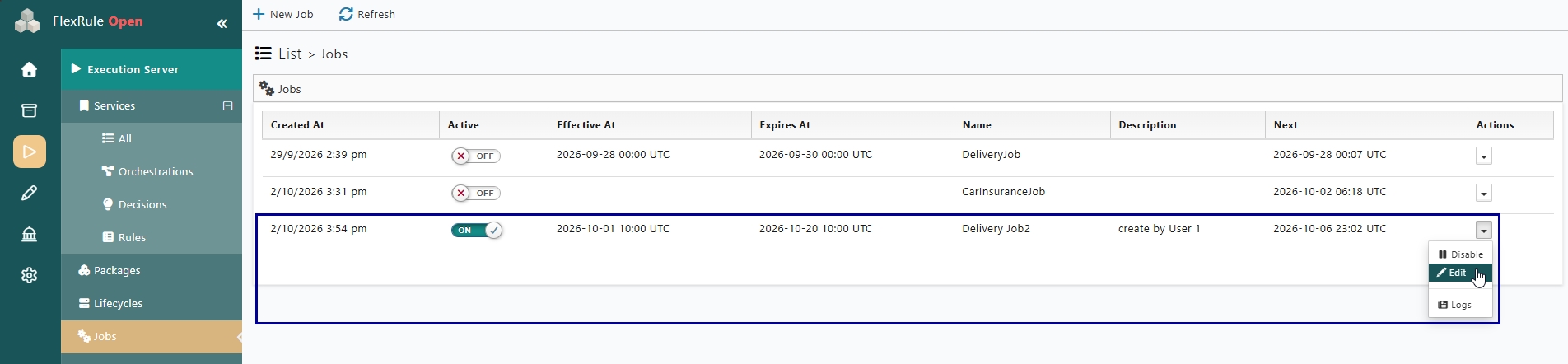
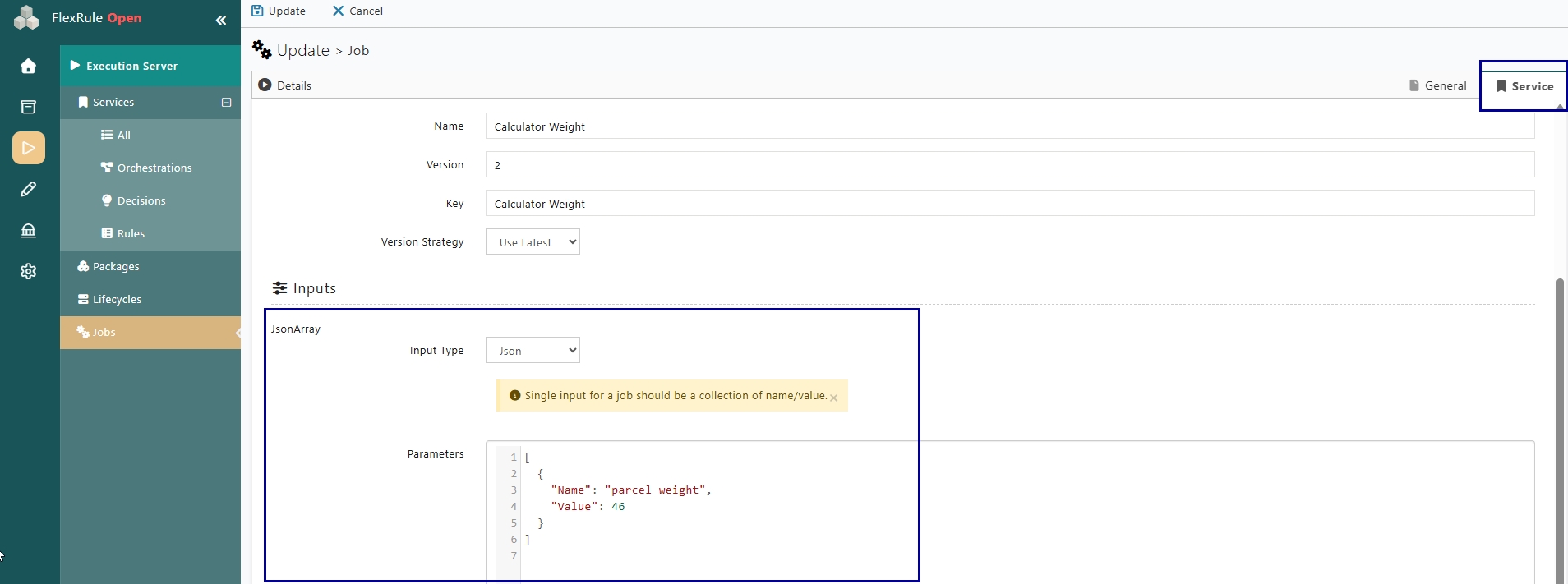
Then go to edit and then services. In the Inputs section, you need to select your desired input type. If you used to have JSON input in V8, you can copy and paste the same input parameters here.
10. If You Need to Roll Back
If the migration was performed using a new database, the original V8 database remains unchanged.
For example:
Original:
FRS8
New:
FRS114
You should be able to access the FlexRule Server V8 in the same way as before, without any interruptions.
11. Troubleshooting
Application secret cannot be decrypted
If you receive an error similar to:
CryptographicException:
Padding is invalid and cannot be removed
This normally indicates that the new nodes are using a different encryption password from the one that was used to encrypt the existing application secret.
Solution
Run the migration command again in every node folder, using the same old configuration and database:
frs migration --oldConfig "<old V8 config>" --db "<new database connection string>"Then restart the nodes.
If the original encryption key is no longer available, the existing application secret cannot be recovered. In this case, open the application’s Keys tab and generate a new secret, or recreate the application.