
◷ Reading Time: 6 minutes
Introduction
The Insurance Premium Calculation sample will show how to build a project that calculates the premium for a car insurance company.
Scenario
In this example, we used different logic documents for various rules to calculate the premium based on the applicant’s information. Through this decision process, we assess the vehicle and the driver’s history and personal suitability. As a result, the insurance company offers a premium for the applicant. The inputs and outputs are as follows.
- Inputs: Vehicle information, Driving history, Personal information, insurance Coverage type.
- Outputs: Vehicle assessment, Driving history assessment, Personal suitability, The Premium calculation formula
Running the Insurance Premium Calculation sample
- Open the file PremiumCalculation.xml

- Click on the Logic Run template.

- Click on any given template.
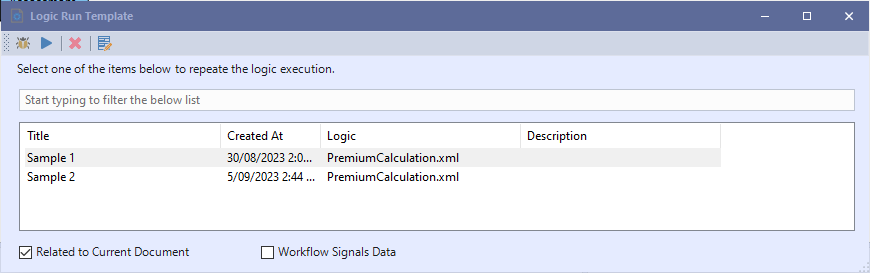
- Debug the sample by clicking on the debug button in the Logic Run Template window.

- You can click the ‘Next Step’ button to go step by step to follow the flow.

- Now, you can see the output values in the ‘Parameters’ window.

Insurance Premium Calculation process steps
The process contains the following steps to calculate the Premium Amount.
- Personal Suitability
- Driver’s History Assessment
- Personal Risk Assessment
- Vehicle Assessment
- Total Risk Assessment
- Premium Calculation
Project Description
The Insurance Premium Calculation project contains the following documents.
Decision Graph
- PremiumCalculation.xml – shows the main data flow
- PolicyPricing.xml – Calculating the premium
- RiskAssessment.xml – Determining total risk assessment
- VehicleAssessment.xml – Assessing the vehicle situation
- DetermineVehicle Age.xml – Determining the vehicle age
- PersonalSuitability.xml – Assessing the applicant based on personal suitability and his/her driving history
- DriverHistoryAssessment.xml – Assessing the driving history based on his/her driving data
- PersonalRiskAssessment.xml – Assessing the applicant based on personal information
- Concept.xml – Define inputs and outputs objects
Business Formulas
- BusinessFormulas.xml – Define the vehicle age
The Flow Design
- Define the Applicant’s information as an input object and a premium calculation formula as an output object.
- Concept.xml

2. Create an expression to determine vehicle age
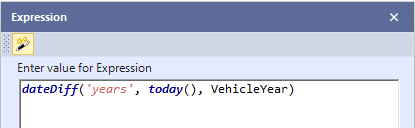
3. Create a premium calculation Decision Graph to assess three aspects: derived history, personal suitability, and vehicle, based on applicant information, which will be taken as an input object.

- Personal Suitability – It consists of a decision table to determine ‘personal suitability’. This value will be used in Personal Risk Assessment Decision Tables.

- Driver History Assessment – In this decision node, driving history assessment is determined to be used for Personal Risk Assessment.

- Personal Risk Assessment – In this decision node, we used the Personal Suitability and Driving History Assessment to determine Personal Risk Assessment. The personal risk assessment will be used for deciding about the total risk assessment.
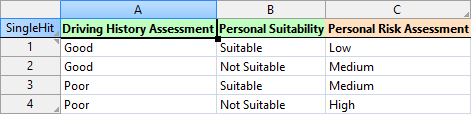
- DetermineVehicleAge – In this decision node, the car’s age will be determined based on the car launch date. It is used on the next step for deciding about the vehicle assessment.

- Vehicle Assessment – In this decision node, The Vehicle assessment is determined.

- Risk Assessment – In this decision node, The total risk assessment is decided based on the vehicle assessment and personal assessment.

- PolicyPricing – In this decision node, the formula for premium calculation is selected based on the risk assessment and coverageType.

Download the project
Use the attachment at the end of the page to download the sample project.